How to learn trading with a full-time job: a practice routine
Build your learning routine around time you can actually protect, then give each session one small output. You do not need to attend a live market session to describe a historical candle, write a conditional decision or review a practice record. If work interrupts you, leave a precise checkpoint instead of trying to remember where you stopped.
This answers a scheduling problem. It does not establish that trading will replace your income or that a short routine will make you profitable.
Start with the constraint, not the market open
The problem appears in real learner accounts. In a 2020 Bear Bull Traders discussion, ktradestocks described limited weekday access to simulator practice. In a 2023 MQL5 question, Bo_Master asked how others balanced learning with employment and family time. These are attributed personal accounts, not a survey or testimonials for our app.
Write down three things before choosing a routine:
- Available time: a window outside work and other commitments, with a realistic stop time.
- One learning task: for example, distinguish a completed candle from one still forming.
- A reviewable output: a screenshot plus a sentence, an unanswered question or a checked calculation.
If you cannot identify the task, use the chart-learning self-check. A topic such as “learn price action” is too large to tell you what to do in the next short session.
An optional 80-minute week
This is an editorial planning example, not a tested training dose, minimum commitment or path to live-money readiness. Change the days and durations to fit your life.
| Window | Task | Output to keep |
|---|---|---|
| Tuesday, 15 minutes | Describe one unfamiliar historical chart at a fixed cutoff | Completed-bar observations and one uncertainty |
| Thursday, 15 minutes | Check the prior note; write one condition before revealing more | The original condition, preserved even if it is wrong |
| Saturday, 20 minutes | Inspect the next permitted candles and compare with the record | What became observable, and when |
| Sunday, 30 minutes | Review the records and select one next exercise | One specific gap, not a profit target |
The total is 15 + 15 + 20 + 30 = 80 minutes. If only a weekend block is available, do the observation, decision and review stages in order within that block. Keep the reveal boundary between them.
If a session is missed, carry the unfinished task forward. Do not add a trade quota or rush through decisions to catch up. If you are too tired to produce a clear note, stop and reschedule; the example is a planning aid, not a test of dedication.
Leave an interruption checkpoint
Use a notebook or your own document. This template is our suggested workflow; it is not an automatic app feature.
| Field | What to record before stopping |
|---|---|
| Case and data | Symbol, timeframe and source or case identifier |
| Visibility boundary | Last completed candle you have seen, including timezone |
| Original task | The exact observation or condition being checked |
| Current state | What is finished and what remains unanswered |
| Next permitted action | What you may inspect next without exposing the whole outcome |
| Exposure | Whether you accidentally saw later prices |
At the next session, read the checkpoint before moving the chart. Confirm that the tool still shows the intended boundary. If you cannot restore that boundary without seeing later prices, label the case as already exposed and use it as a worked example. Choose a different unseen case for an independent practice attempt.
A saved note is not proof of a correct decision. Its value is that you can compare what you wrote with what was knowable then. The journal review guide explains how to turn that comparison into a next exercise.
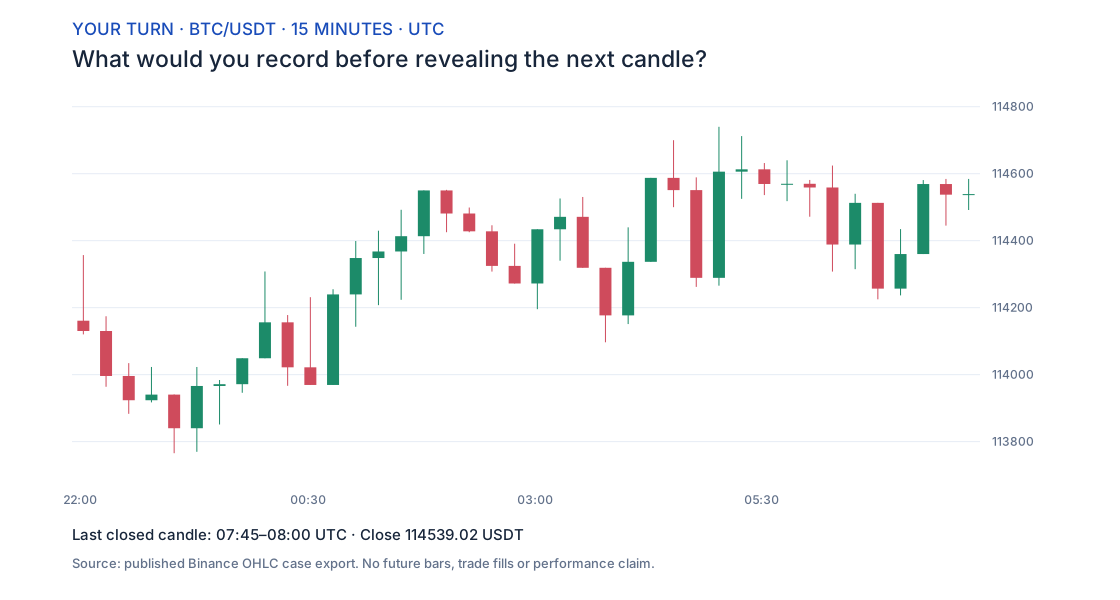
Try the checkpoint on this real BTC chart
Provenance: the site’s published BTC/USDT OHLC case, sourced from Binance public market data. The deterministic chart shows the last 40 fully closed 15-minute candles available at October 1, 2025, 08:00 UTC. Later candles are excluded. This selected educational case is not a random sample or an executed trade; see the data methodology.
Before reading the check below:
- Record the last visible candle’s opening time and the time it finishes.
- Copy its close from the chart. Leave the next candle’s close blank.
- Write a checkpoint for an interruption now: “Task complete: identify the last completed bar. Next task: inspect one later completed bar and record its close.”
- State one thing the visible chart cannot establish about that next bar.
Check: the last bar opens at 07:45 UTC and completes at 08:00 UTC; its close is 114,539.02 USDT. Fifteen minutes separate those timestamps. The next bar’s close is not shown, so its value remains unknown in this exercise. Do not replace that blank with a guess or search the source’s future series before recording your answer.
You have produced a restart point that another person could understand. You have not tested an entry strategy, modelled a fill or demonstrated profitability. If you already knew this case, treat it as an example of record keeping and use unfamiliar data for the next attempt.
Choose practice that fits the available attention
Historical replay lets you inspect past candles outside the original session’s hours. Real-time paper trading follows a different clock. Check the mode you are using; the practice-tool comparison explains the distinction and links official documentation.
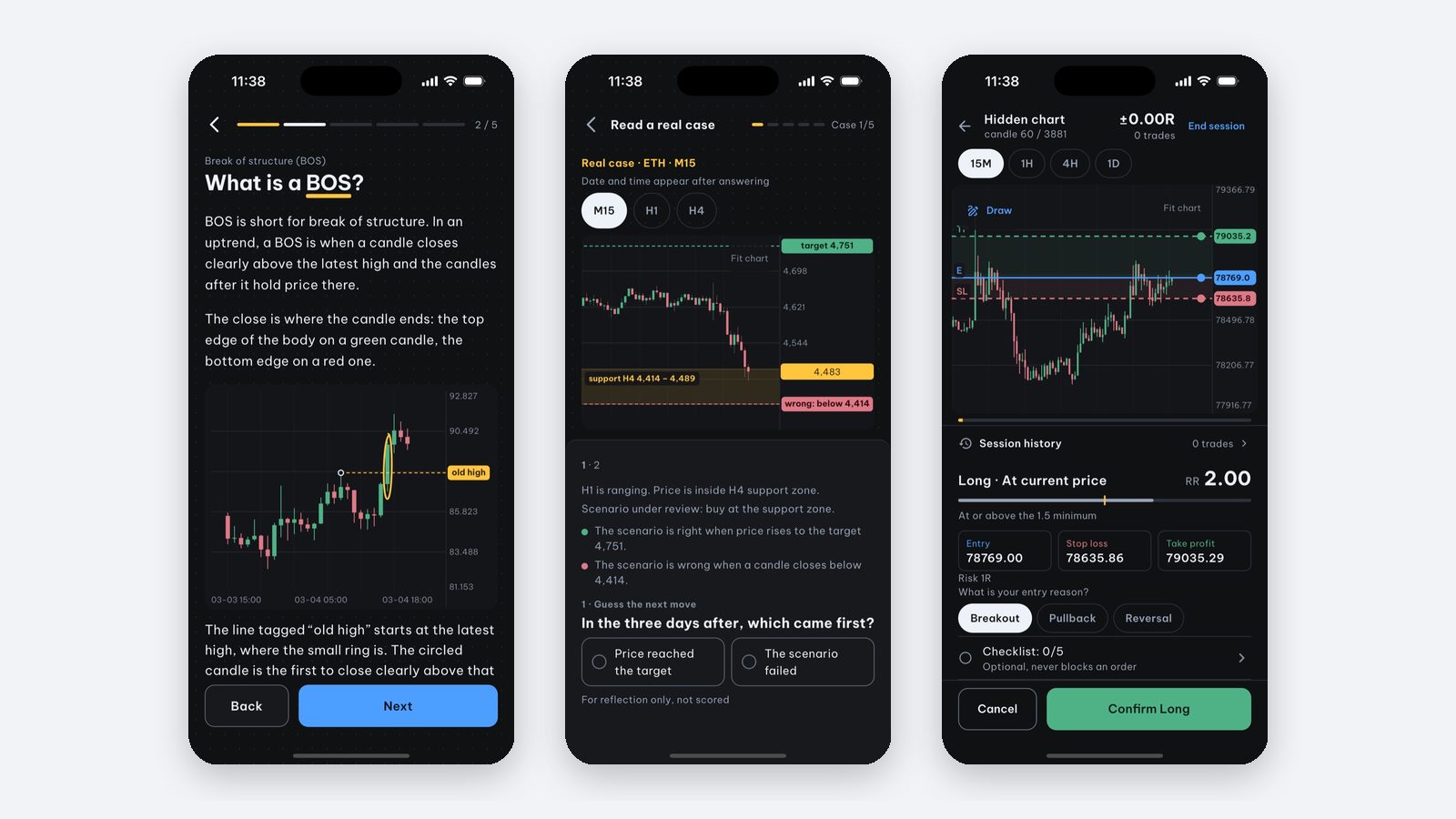
For Price Action Trading Simulator, iPhone and iPad users can try the first three candle lessons, the opening chart-reading check and one real-case session containing five cases for free. Manual backtesting reveals historical candles one by one and saves sessions for review; starting a session requires Pro. Keep the interruption template separately. The app does not provide data export or a broker connection and does not execute real-money trades.
A higher chart timeframe is not automatically a solution for a busy live trader: it changes the rule being studied. Nor does replay reproduce all spreads, slippage or the pressure of losing real money. Start by asking whether the exercise fits your learning task and time window, then review the quality of the record.
Sources and scope
The routine and checkpoint are our original educational suggestions. The two forum accounts establish that individuals raised this constraint, not its prevalence or a guaranteed solution. Pipfluent’s full-time-job learning guide was read as a reference for addressing the same reader job; its competency timelines and trade-count prescriptions are not adopted here. The chart’s figures come from the linked historical export. Product access statements follow our verified app facts, checked on October 21, 2026.
Frequently asked questions
Can I learn trading while working full-time?
You can organize study and historical chart exercises outside work and live-market hours. That makes practice possible; it does not guarantee a profitable strategy or readiness to risk money.
How many hours a week do I need?
There is no validated universal number here. The 80-minute week below is an optional planning example. Adjust it to your obligations and judge whether it produces clear, reviewable work rather than a required trade count.
What if I can only practise at weekends?
Historical charts let you study a past session when you are available. Keep the future hidden and record the decision boundary. Historical practice does not reproduce live execution or financial pressure.
Is manual backtesting free in Price Action Trading Simulator?
The setup screen is free to browse; starting a backtest session needs Pro. Free access includes three candle lessons, the opening chart-reading check and one real-case session of five cases.
Written by the app’s development team. See the data, selection rules and limits of these first-party examples. Sources & method →
Keep reading
-
I study trading but still feel lost. What should I practise?
If more trading videos leave you confused, find the first task you cannot perform: reading candles, defining a rule, sizing risk or reviewing decisions.
-
How to practice price action on iPhone without risking real money
Want to practice price action on iPhone before trading real money? How to practice on historical charts and what Price Action Trading Simulator offers.
-
Trading journal: what to record and how to review mistakes
Record rules and planned risk before entry, then actual fills, costs and compliance. A journal separates execution mistakes from an untested strategy.